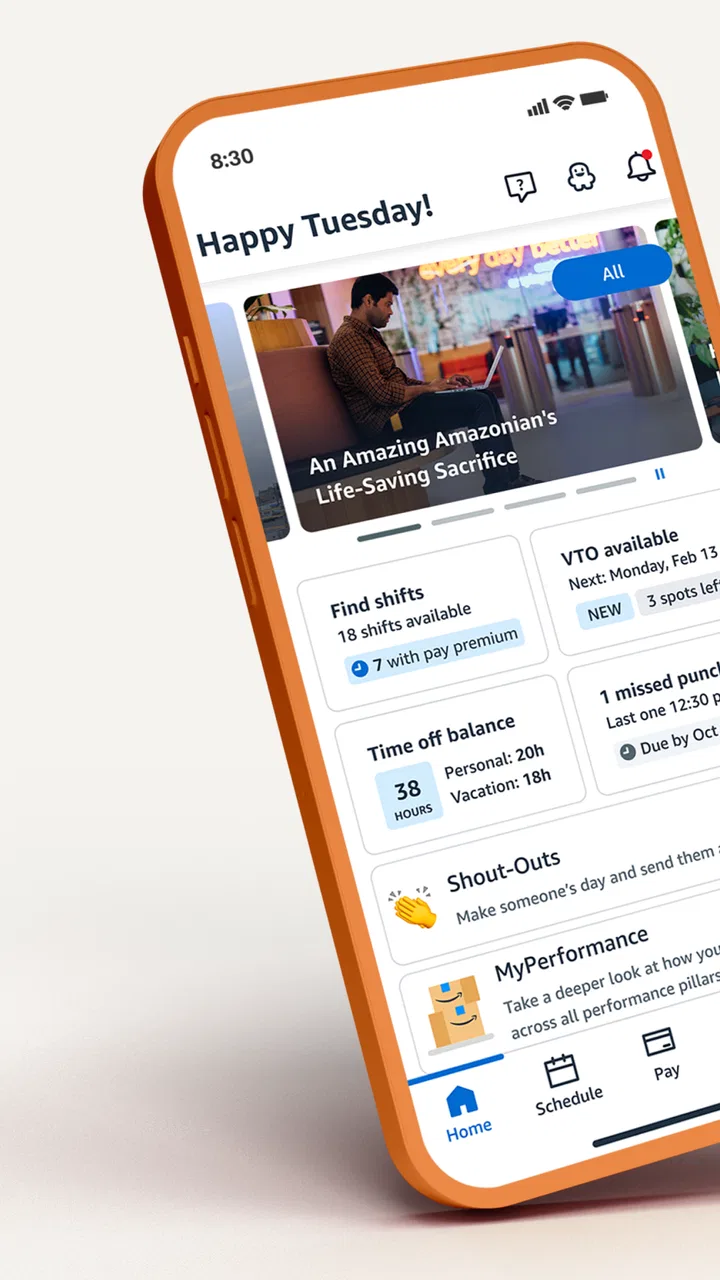
Amazon A to Z
- 4.1
- Rating
- 5.00M
- Installs
- Free
- Price

 Analysis by App-foxy
Working at Amazon can involve a surprising amount of small, time-sensitive admin: checking a schedule, finding work information, reviewing pay details, or keeping up with changes that affect the next shift. Amazon A to Z is built around that work-life connection rather than around general productivity. I see it as a practical employee companion from Amazon Mobile LLC, especially useful when I need a work-related detail quickly without switching between unrelated tools.
The app is free, aimed at Everyone, and belongs to the Business category. It has reached over five million installs, with an average rating of 4.3 from around ninety-three thousand ratings. Those figures suggest that it has become a familiar part of the routine for many Amazon employees, although popularity alone does not make every screen equally convenient. My experience is that its value depends heavily on whether the information I need is available to my employee account and whether I am using it for a quick check rather than expecting a fully flexible workplace management system.
From a work question to a useful answer
I find that the most useful work app is often the one that helps me answer a specific question without turning a quick check into a long session. This section looks at how I decide what to verify first, and why a clear boundary between an employee account and ordinary household use matters before anyone else handles the phone.
You May Also Like

 Blood Strike: 2.5 Anniversary
Blood Strike’s Loadouts Turn Every Drop Into a Tactical Gamble
A close look at Blood Strike’s custom loadouts: how fast access to signature weapons reshapes its battle royale rhythm, rewards preparation, and narrows the gap between fights.

 Pandora - Music & Podcasts
Pandora’s Music Is Easy to Start, but Harder to Recover
Pandora’s strength is its low-effort path from a seed to a station. Its weak spot is how much confidence it asks you to place in connection, setup, and quiet recovery.

 8 Ball Pool
 Is Built on Rivalries, Rematches, and Routine
A close look at the rivalries, rematches, shared routines, and unanswered safety questions that turn a quick pool match into a persistent mobile community.

 Samsung Music
’s Quiet Strength Is Playing What You Already Own
Its reach comes less from spectacle than from dependable access to a personal library. That simplicity is both the app’s strongest retention engine and its ceiling.

 AccuWeather: Weather Radar
AccuWeather Review: A Quick, Clear Forecast for Everyday Decisions
For everyday plans, the best forecast is the one you can understand quickly. AccuWeather makes rain timing, radar, and local conditions easy to act on, with a few trade-offs.

 Hill Climb Racing
Why Hill Climb Racing Still Turns Crashes Into One More Run
A tiny car, a bumpy hill and one more upgrade: Hill Climb Racing keeps resurfacing because its simple chaos makes every near-miss feel personal.
More From Our News Desk



Starting with the situation that brings you to the app
The best way to understand this app is to begin with a realistic question: “What do I need to know before I leave home?” That might be a shift detail, a work-life item, or another piece of employee information connected with Amazon. Instead of opening a browser, searching through messages, or relying on memory, I can start with one work-focused place.
That narrow purpose is an advantage. A general calendar may show an appointment but not necessarily the employee context around it. A notes app can store reminders but cannot replace an official workplace source. A messaging thread may contain an answer, yet it can be difficult to tell whether the information is still current. Amazon A to Z is more useful when the question concerns my relationship with Amazon itself, because the app is designed around that employee workflow.
The first practical step is to install the app on a compatible Android device. It supports Android versions from 5.0 onward, which makes it accessible on many older phones as well as newer ones. The current version is 5.0.325.0. I would still keep the app updated when possible, because work-related information is more valuable when the application is operating with its latest available fixes and account handling.
After opening it, the important starting point is the employee account rather than a personal profile I might use for shopping. That distinction matters. This is not the Amazon retail app, and I would not choose it to browse products, track deliveries, or manage a consumer order. Its job is to connect an Amazon worker with work-life information, so the usefulness of the first screen depends on having the appropriate employee access.
Moving through the daily check
Once I am inside, I treat the app like a short checklist. I look for the information that affects the immediate day first, then move to anything that requires a little more attention. This approach is faster than opening every available area in sequence, and it reduces the chance of overlooking the one detail that actually matters before a shift.
A realistic morning might look like this: I am preparing to leave, I want to confirm the work item that applies today, and I need to settle a question before commuting. I open A to Z, authenticate if needed, review the relevant information, and then close it once I have the answer. The outcome is not a long session; it is confidence that I am acting on the current employee information rather than an old screenshot or an informal reminder.
That short-session design is one of the app’s strongest qualities. I do not need to build a personal system around it or spend time configuring a complex dashboard. When the information is where I expect it to be, the app turns a vague “I should check that” moment into a quick routine. For shift-based work, that can be more useful than a feature-rich planning tool that requires constant manual maintenance.
I also find it helpful to separate official information from personal planning. If I want to remember a bus departure, prepare a lunch reminder, or plan an appointment after work, I use my normal calendar or notes app. A to Z should be the source I consult for Amazon-related details, while my other tools handle the rest of my life. Keeping those roles separate avoids duplicating information and makes it clearer which source should win when two reminders disagree.
Handling the handoffs between employee, app, and workplace
The app is only one part of the workflow. Information has to pass from Amazon’s workplace systems to the employee account, then from the account to the mobile interface, and finally from the screen to a decision I make. Each handoff can introduce friction. If the account does not show what I expect, the problem may not be the phone or the app itself; it may involve access, timing, or the way the workplace information has been recorded.
This is why I would not treat a personal note or screenshot as a permanent substitute for checking the app. A screenshot can be convenient when I am offline or in a hurry, but it can become misleading after a change. My better habit is to use saved notes only as prompts and return to the live employee information before making an important decision about work.
Another useful handoff is between the app and a supervisor or workplace contact. If I need clarification, I can first check what A to Z actually displays, then describe the specific issue rather than asking a broad question. For example, “The information shown here does not match what I was told” is more actionable than “What is happening with my schedule?” The app does not remove the need for human communication, but it can give that conversation a clearer starting point.
I would also avoid assuming that every issue can be solved by repeatedly refreshing the screen. If the information remains unclear or does not match the workplace instruction, the sensible next step is to use the appropriate Amazon support or management channel available to me. The app is a convenient access point, not a replacement for every employee process.
What the workflow produces when it works well
The result I want from A to Z is simple: fewer avoidable surprises and less time spent hunting for work information. It can help me begin a shift with a better understanding of what I need to know, while keeping employee-related details separate from personal apps and casual messages.
This is especially valuable for someone who works variable hours, checks information while away from a computer, or prefers using a phone instead of remembering a workplace portal address. The mobile format makes the process feel more immediate. I can check the relevant information during a normal transition in the day rather than waiting until I have access to a desktop.
There is also a quieter benefit: consistency. When I use the same place for Amazon work-life checks, I am less likely to rely on several competing sources. That does not guarantee that every detail will be easy to interpret, but it gives me a repeatable habit. In my view, that is the app’s real strength—not entertainment, customization, or broad phone utility, but helping an Amazon employee establish a dependable check-in routine.
The app’s store presence supports that practical role. It is free, and its 4.3 average from around fifteen thousand reviews indicates that many users find it worthwhile while still leaving room for frustration. I read that balance as realistic: an employee tool can be genuinely useful without being polished in every situation.
Where the flow breaks down
The biggest limitation is that this is not a universal work organizer. Its usefulness is tied to Amazon employment and the information associated with the employee account. Someone who is not an Amazon worker has little reason to install it, and even an employee may need another app for personal scheduling, task management, commuting, or broader career planning.
The app can also feel less satisfying when I want to combine work information with the rest of my calendar. A general calendar is better at showing appointments, family commitments, travel time, and reminders in one view. A to-do app is better for breaking preparation into tasks. A workplace portal accessed through a browser may sometimes be preferable when I need a larger screen or want to handle several pieces of information at once. A to Z wins for focused mobile access, not for being the best tool in every category.
There is a trade-off between simplicity and visibility. A focused employee app can make a quick check easier, but it may not provide the same flexibility as a full desktop system. If I am trying to investigate a complicated discrepancy, compare several records, or keep multiple work streams open, a browser or direct workplace support channel may be more comfortable. I would use the phone app for the first check and switch tools when the task becomes investigative rather than routine.
Account and connectivity friction can interrupt an otherwise short workflow. A work app is most useful when it opens cleanly and displays the information I need at the moment I need it. If I am standing outside, commuting, or working with an unreliable connection, I should avoid depending on a last-second check as my only preparation. Checking earlier and keeping a personal reminder of the confirmed item is a sensible backup, while still treating the app as the place to verify current information.
Another point worth remembering is that the app does not interpret every situation for me. Seeing an item on screen is not the same as understanding how it applies to a particular workplace conversation or exception. When the displayed information and a direct instruction conflict, I should not guess. I would record the discrepancy, contact the relevant workplace channel, and use the answer I receive to decide what to do next.
Who will get the most from it
I would recommend Amazon A to Z to an Amazon employee who wants a straightforward mobile route to work-life information and prefers checking a phone over using a desktop portal. It is a good fit for quick routines: checking before leaving home, confirming a detail during a break, or reviewing information before speaking with a supervisor.
It is also suitable for someone who wants to keep work administration separate from personal apps. That separation can reduce clutter and make it easier to identify which information comes from an official Amazon source. The app’s Everyone content rating may also make it comfortable to keep on a shared household device, although I would still be careful with account privacy and would not leave an employee session open for someone else to use.
I would suggest skipping it if the goal is general productivity, a universal calendar, or consumer Amazon shopping. Installing it for those purposes would create confusion rather than solve a problem. I would also choose a browser-based workplace process or another official channel when I need a detailed review that is awkward on a small screen.
Small habits that make the experience better
- Check before the pressure moment: Review important work information earlier instead of waiting until you are already leaving or commuting. That gives you time to resolve a mismatch through the proper workplace channel.
- Use one source for verification: Treat personal notes and screenshots as reminders, not as the final authority. Return to the current employee information before relying on it.
- Separate official details from personal planning: Let A to Z handle Amazon-related information, while your calendar manages appointments, travel, and family commitments.
- Describe problems precisely: If you need help, note what the app shows and what you expected. A specific discrepancy is easier to hand off than a general complaint.
These habits do not add features to the app, but they make its role clearer. The first tip reduces last-minute stress, the second limits outdated information, and the third prevents the app from being judged unfairly for not acting like a personal organizer. The fourth makes the transition from mobile self-service to human support more efficient.
My final view after following the full workflow
Amazon A to Z succeeds when I use it for what it is: a focused Business app for managing the Amazon side of work life from a mobile device. It starts with an employee question, moves through a quick account-based check, hands unclear cases to the appropriate workplace contact, and ends with a more informed decision. That complete flow is more valuable than a long feature list because it reflects how I actually use the app.
It is not perfect. The experience can lose its convenience when information is unclear, when a task needs a larger screen, or when I expect it to replace my calendar and personal planning tools. Still, the free price and focused purpose make it easy for the intended audience to try. With over five million installs and a broad Everyone rating, it is clearly established as an employee utility rather than a niche experiment.
I would keep it on my phone if I worked at Amazon and regularly needed quick access to work-life information. I would pair it with a calendar, notes app, or browser when my needs extend beyond that specific workflow. My recommendation is positive for Amazon employees who want a convenient official check-in point, but conditional for anyone expecting a complete workplace or personal productivity suite.
FAQs for Amazon A to Z
01What is Amazon A to Z used for?
Amazon A to Z is an app designed for Amazon employees to manage their work schedules, track time-off balances, view pay stubs, and access company news. It serves as a comprehensive tool for employees to stay connected with their work environment and manage their work-life balance effectively.
02How do I log into the Amazon A to Z app?
To log into the Amazon A to Z app, you need your Amazon login credentials. This typically includes your Amazon username and password. If you are having trouble logging in, ensure your credentials are correct or reset your password through the app's login assistance feature.
03Is the Amazon A to Z app available on both Android and iOS?
Yes, the Amazon A to Z app is available for both Android and iOS devices. You can download it from the Google Play Store for Android devices or the Apple App Store for iOS devices. Ensure your device meets the minimum system requirements for optimal performance.
04Can I access my work schedule offline using Amazon A to Z?
The Amazon A to Z app primarily requires an internet connection to access real-time updates. However, you can view previously downloaded schedules offline. It is recommended to check for updates regularly to ensure you have the most current information regarding your work schedule.
05Are there any security features in the Amazon A to Z app?
Yes, the Amazon A to Z app includes several security features to protect your personal and work-related information. These include secure login protocols, data encryption, and regular updates to address potential vulnerabilities. Always ensure the app is updated to the latest version to benefit from enhanced security measures.
Pros
- User-friendly interface for easy navigation.
- Real-time updates on shift schedules.
- Direct access to pay and benefits info.
- Seamless communication with management.
- Push notifications for important updates.
Cons
- Occasional login issues reported by users.
- Limited customization for notifications.
- Some features require stable internet.
- Infrequent app crashes on older devices.
- Navigation can be slow during peak times.

Amazon A to Z
Gallery